Casino Deposit Not Credited Pakistan – Fix Guide
Independent troubleshooting when an EasyPaisa or JazzCash deposit leaves your wallet but Royal X Casino balance does not update. What to check before contacting support.
What This Guide Covers
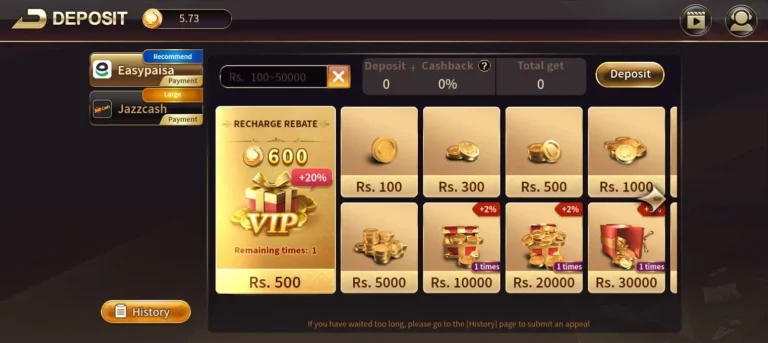
This page is for deposit troubleshooting: you started an EasyPaisa or JazzCash top-up, but the Royal X Casino balance did not update as expected.
It is not the withdrawal pending guide. If money is stuck on cashout, use casino withdrawal pending fixes instead.
For happy-path deposits, start with:
Quick Checklist (Do This First)
- Confirm whether JazzCash / EasyPaisa shows a successful debit (or only a pending/failed attempt).
- Refresh the casino Wallet / balance screen and check in-app transaction history.
- Match any reference / transaction IDs between the wallet and the casino if both show one.
- Wait a short period and refresh again — do not send a second deposit until you understand the first attempt.
- Note the amount, time, wallet number, and screenshots for support.
- Only then contact in-app support (this website cannot credit wallets).
Exact processing windows vary. Trust the status shown in the app and your payment screen — not remembered “instant” promises.
Deposit Missing vs Withdrawal Pending
| Situation | What you usually see | Use this guide |
|---|---|---|
| Deposit not credited | Wallet debited (or pending), casino balance unchanged | Yes — this page |
| Withdrawal pending | Casino cashout stuck; wallet not credited yet | Withdrawal pending fix |
| Method missing | JazzCash/EasyPaisa not listed under Add Cash | Deposit spokes + /download reinstall checks |
Common Causes
- Wallet payment still pending / failed while you assumed success
- Casino balance needs a manual refresh
- Duplicate taps creating two attempts (one failed, one pending)
- Wrong account / guest session vs registered account
- Temporary wallet or app connectivity issues
- Offer/bonus screens distracting from the cash balance view
Step-by-Step Diagnosis
1. Verify the wallet side
Open EasyPaisa or JazzCash history:
- No debit → the casino likely never received a completed payment; retry only after reading the failed reason
- Pending → wait and refresh; avoid a second deposit
- Successful debit → keep the reference and move to casino-side checks
Wallet-specific flows: EasyPaisa deposit · JazzCash deposit.
2. Verify the casino side
- Pull to refresh Wallet / Add Cash history
- Confirm you are logged into the same account used when depositing (login guide)
- Look for a matching amount and timestamp
3. Avoid duplicate deposits
A second payment “to be safe” is a common way to lose track of funds. Resolve the first reference before trying again.
4. Collect evidence for support
Prepare:
- Wallet transaction / reference ID
- Casino username or registered mobile number
- Approximate time and amount
- Screenshots of wallet success and casino balance/history
Contact support inside the app. Never share OTPs.
When to Reinstall
If the wallet menu fails to load or the app crashes mid-deposit UI, reinstall only from the download guide and the APK safety checklist. Reinstalling does not by itself recover a missing credit — keep your references.
FAQ
How long should I wait before contacting support?
A: Check both histories first. If the wallet shows a successful debit and the casino still shows nothing after a reasonable refresh window, contact in-app support with references. There is no single fixed minute count that applies to every attempt.
The wallet failed — can I try again?
A: Yes, after confirming no debit left your wallet. Use the amount limits shown on the current payment screen.
Is this the same as a pending withdrawal?
A: No. Use the withdrawal pending guide for cashouts.
Related Guides
- Payments hub
- How to deposit money
- EasyPaisa deposit guide
- JazzCash deposit guide
- EasyPaisa & JazzCash overview
- Withdrawal pending fixes
- FAQ hub
- Download APK
Next Step
Once the balance appears, deposit only what you planned for entertainment and keep cashout details ready via the withdrawal guide.