Royal X Casino Withdrawal Guide – Cash Out with EasyPaisa, JazzCash & More
Independent withdrawal walkthrough for Royal X Casino in Pakistan: wallet methods, step-by-step cashout flow, what to verify in-app, and links to pending-fix help.
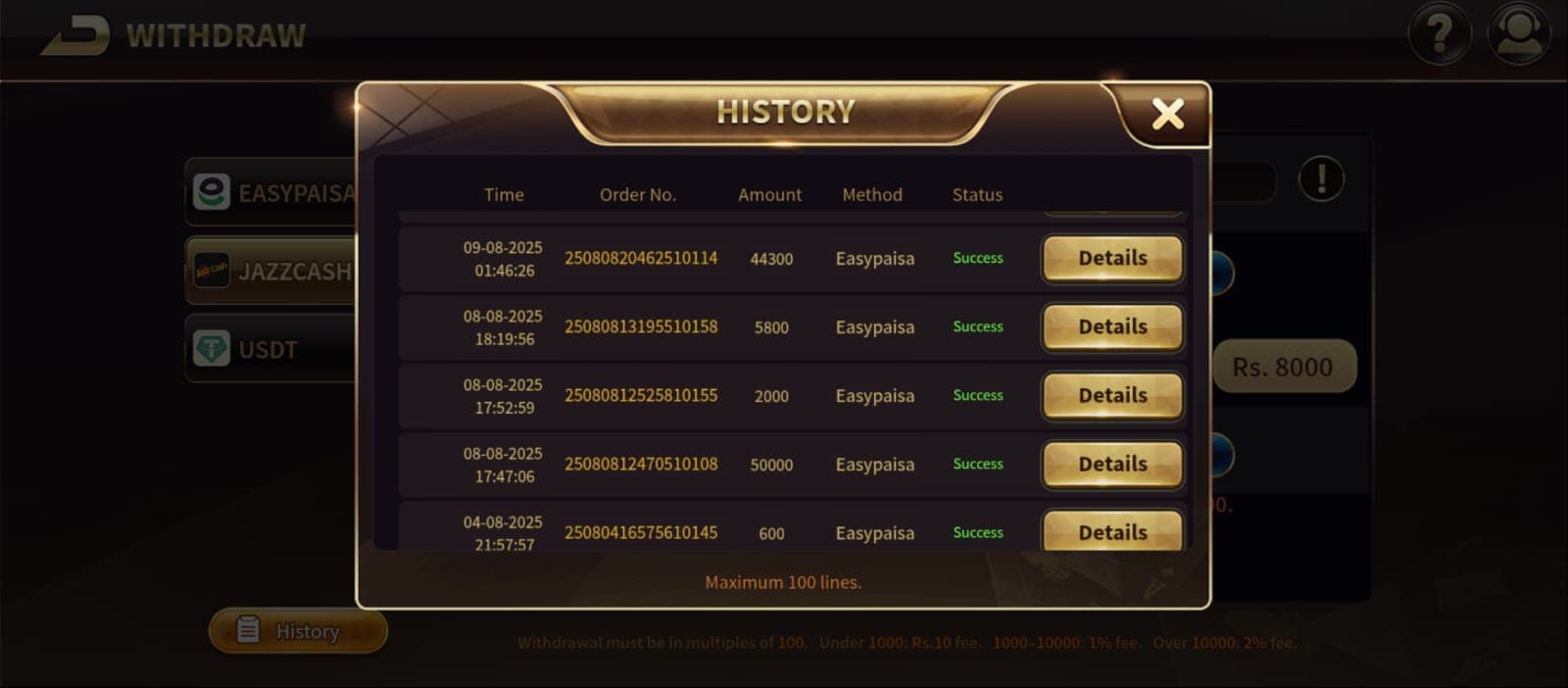
Royal X Casino Withdrawal Guide
This independent guide explains how to request a withdrawal from Royal X Casino using common Pakistan payment rails — typically EasyPaisa, JazzCash, and, when available, USDT or bank transfer.
Processing times, minimums, and fees can change. Always confirm the latest limits and status messages inside the app before you rely on any cashout. For wallet overviews and deposit context, start with the payments hub.
Withdrawal Methods (Overview)
Royal X Casino commonly supports mobile wallets and may also offer crypto or bank options depending on your account and app build:
| Method | Typical use case | Notes |
|---|---|---|
| EasyPaisa | Everyday cashouts to a mobile wallet | See the dedicated EasyPaisa withdrawal guide |
| JazzCash | Everyday cashouts to a mobile wallet | See the dedicated JazzCash withdrawal guide |
| USDT | Larger or crypto-preferring transfers | Network/address mistakes are hard to reverse — double-check details |
| Bank transfer | Larger PKR cashouts | Often slower than wallets; confirm cut-off times in-app |
For side-by-side wallet context, read EasyPaisa & JazzCash payments and EasyPaisa vs JazzCash.
Step-by-Step: How to Withdraw
Exact labels can vary by app version. The usual flow is:
- Log into your Royal X Casino account
- Open Wallet (or My Wallet) and choose Withdraw
- Select your payment method (EasyPaisa, JazzCash, USDT, or bank)
- Enter the amount you want to cash out
- Confirm wallet number, bank details, or USDT address carefully
- Submit the request and save any reference ID shown
After you submit, check the in-app transaction status. If the request stays pending longer than you expect, use the withdrawal pending fix guide before opening a second request.
What to Verify Before You Cash Out
- Same wallet / account identity — Cash out to a wallet or bank account in your name when the app requires it
- Bonus wagering — Unfinished bonus terms can delay or block withdrawals; check promotions before you request a payout
- Minimum amount — The payments hub notes typical wallet minimums (often around Rs.200 for mobile wallets); confirm the live minimum on the withdraw screen
- Network / address (USDT) — Wrong network or address can mean permanent loss of funds
- Screenshots — Keep a capture of the request and wallet confirmation until funds arrive
Common Withdrawal Questions
Q: How long do withdrawals take?
Times vary by method, verification, bonus status, and network load. Many wallet cashouts complete within minutes to a few hours, but that is not a guarantee. Trust the status shown in the app and your wallet history.
Q: What is the minimum withdrawal?
Confirm on the withdraw screen. For orientation, see typical figures on the payments hub and method-specific guides.
Q: Are there fees?
Fee rules are set in the app and can change. Check the withdraw confirmation screen before you submit.
Q: My withdrawal is stuck on pending — what now?
Follow casino withdrawal pending fixes: verify wallet details, bonus locks, and support steps with your transaction ID.
Safer Cashout Habits
- Withdraw to the same method you used to deposit when possible
- Cash out a small test after your first wins before scaling amounts
- Do not share OTPs or wallet PINs with anyone claiming to be support
- Keep play entertainment-first — see responsible gaming
Related Guides
- Payment methods hub
- Download / install guide
- EasyPaisa & JazzCash overview
- JazzCash withdrawal guide
- EasyPaisa withdrawal guide
- Withdrawal pending troubleshooting
- How to deposit (general)
Next Step
If you still need the app installed, use the APK download guide, then fund and cash out through flows documented in the payments hub. Always confirm live limits and status in-app.